EngineeringA Developer CLI Portfolio That Lives Inside Your Terminal | npx vishalrmahajan
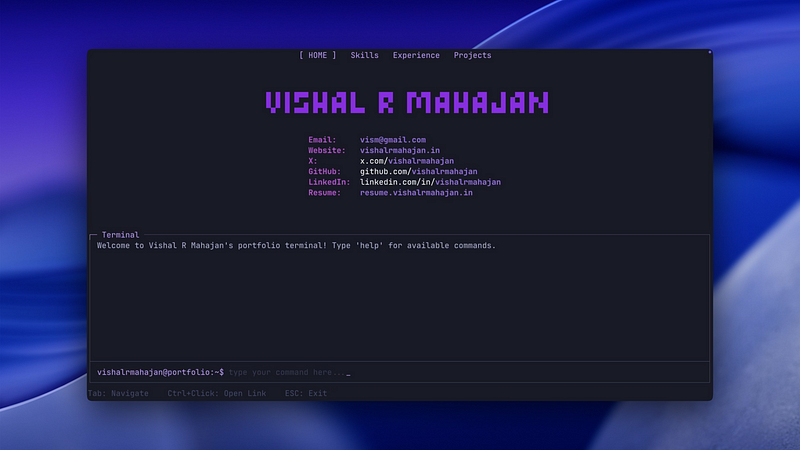
IntroductionImagine a world where your developer portfolio isn’t just another web page, but an experience that comes to life right inside the terminal , a familiar environment for every coder. That’s exactly the idea behind npx vishalrmahajan: my personal CLI-based portfolio, accessible to anyone, anywhere, with a simple command.In this post, I’m sharing the journey, technical architecture, creative ideas, and a step-by-step approach. Whether you love tinkering with Node.js or just want your portfolio to stand out, this guide will help you craft an unforgettable, interactive command-line narrative.Why Build a Terminal Portfolio?Authentic for developersIt tells your story in a space where developers naturally spend time.Instant accessAnyone can type npx vishalrmahajan and dive in. No browser needed.InteractiveSupports real commands, navigation, and links that actually work.Unusual in the best wayMost portfolios live on the web. This one lives in the command lineThe Technical Architecture1. Terminal UI with terminal-kitThe interface uses terminal kit, a powerful library for building terminal applications. It helps create a smooth user experience with features like:Section navigation (Home, Skills, Experience, Projects)Layouts that adjust when the terminal is resizedBold headings, ASCII art, and visual structure2. Modular Section DesignEach part of the portfolio is kept in its own file to make things easy to maintain and extend.home.js contains the welcome message and profile linksskills.js lists the languages, tools, and frameworksexperience.js shows your work history and key highlightsprojects.js walks through your favorite work with links and short descriptionsYou can also include hidden content, such as fun easter eggs, an “about me” story, or a simple terminal game.3. Command input and navigationThe terminal isn’t just for reading. It’s interactive. Users can:Type help to view available commandsJump between sections by typing their namesUse commands like github or linkedin to open linksA custom command handler listens for input, maps commands, and even launches external URLs using the [open](https://www.npmjs.com/package/open) package.4. Visual touches and animationsOn startup and exit, simple animations like spinners and progress bars make the experience smoother and more personal. Libraries like [chalk](https://www.npmjs.com/package/chalk) and [cfonts](https://www.npmjs.com/package/cfonts) let you add colors and large text fonts that feel polished and fun without going over the top.5. Clean formatting and edge case handlingTo make sure your output looks great on every terminal:Add terminal link to make links clickable in supported environmentsWatch for screen size changes and redraw the layout to keep everything clean and readableInitalizing Your Own: Step-by-Step GuideYou don’t need much to get started. Here’s a basic walkthrough to set up your own terminal-based portfolio.1. Project Bootstrapmkdir my-terminal-portfolio
cd my-terminal-portfolio
npm init -y2. Entry PointCreate index.js#!/usr/bin/envconsole.log("This is terminal portfolio");Update your package.json :"bin": {
"myportfolio": "./index.js"
}3. Run and PublishTest locally: node index.jsMake your script executable: chmod +x index.jsPublish on npm: npm publishAnyone can now do:npx myportfolio4. Libraries You Can Use to Build and Polish ItYou can use the following libraries to build your own terminal-based portfolio with structure, interactivity, and style:terminal-kit : For building responsive terminal UIschalk : For adding color and emphasis to your outputcfonts : To display stylish ASCII headers and bannersopen : To open links and external apps directly from your terminalterminal-link : For clickable links in supported terminalConclusionA terminal-based portfolio is more than just a cool trick. It’s a creative way to express your personality, show off your skills, and spark curiosity. npx vishalrmahajan reflects who I am and how I think in a way a static page never could.If this sounds fun, build your own. Experiment. Tell your story in the terminal. You might just surprise yourself and the next person who runs your command.Want to connect, try out npx vishalrmahajan, or share your own? Reach out on Twitter, or just type chat on npx vishalrmahajan.Happy hacking.